logo

Increasing Productivity with Customized Layout

Tailor Your Workspace

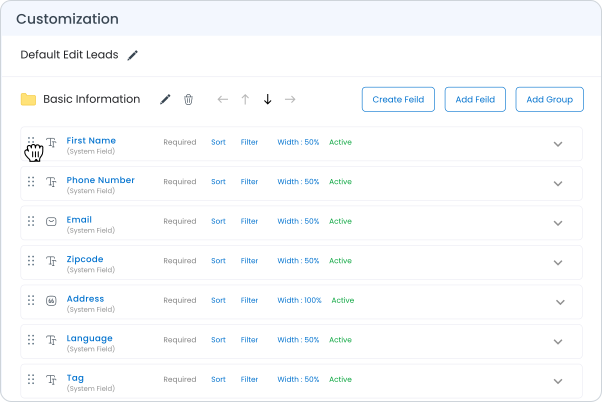
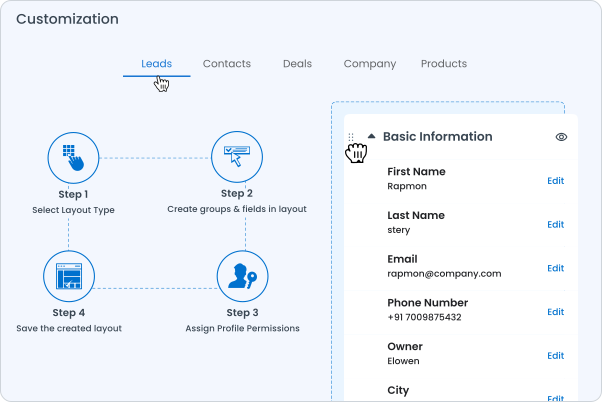
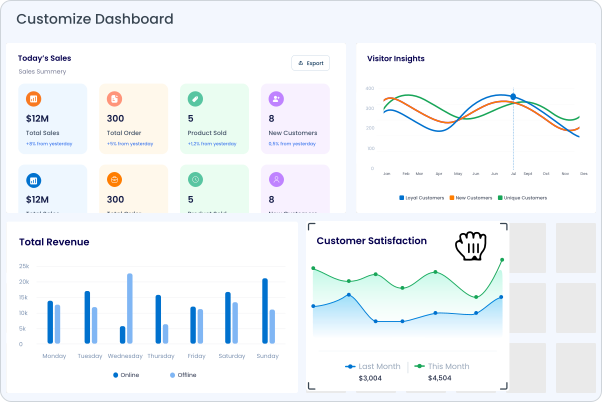
  • Drag-and-Drop Interface:Easily adjust your CRM dashboard and data fields to fit your daily tasks.
  • Role-Based Views:Create customized views that cater to different team roles.
  • Workflow Customization:Configure your CRM to mirror your unique sales processes and customer interactions for greater productivity.
Customizable
Customizable

Enhance User Experience

  • Shared Layouts:Develop and share layouts among team members to maintain consistency and support collaborative efforts.
  • Adaptive Forms:Modify forms and fields to capture the specific data you need, reducing clutter and focusing on actionable insights.

Streamlined Collaboration

  • Personalized Dashboards:Design dashboards that highlight key metrics, active deals, and tasks, optimizing your team’s ability to make informed decisions quickly.
  • Screen Optimization:Ensure a seamless experience across devices with layouts that adapt automatically to desired screen sizes.
Customizable

Overview of few more features in Customization Layout

Workflow customization

Create & customize workflows that guide tasks and processes according to predefined rules and sequences.

Automation Customization

Customize Automation fields as per your business flow.

Report Customization

Create and customize as many as smart lists/reports.

Template Customization

create and use custom templates for emails, proposals, reports, and other documents within the CRM.

Reviews & Ratings

Real reviews and top ratings that highlight Togile CRM’s reliability, performance, and user satisfaction.
grow-marketgrow-market
grow-marketgrow-marketgrow-market
grow-marketgrow-market

Trusted by Leading Companies
Knowledge Center

Loading....

Frequently Asked Questions

If your question is not listed, please refer to the documentation, or ask us your question directly.

What is a customized layout in a CRM system?
Can I customize the CRM layout without technical skills?
How does role-based customization enhance CRM usability?
Can customized layouts be saved and applied to other users in the CRM?
Are there limitations to how much a Togile CRM layout can be customized?

What is a customized layout in a CRM system?

Can I customize the CRM layout without technical skills?

How does role-based customization enhance CRM usability?

Can customized layouts be saved and applied to other users in the CRM?

Are there limitations to how much a Togile CRM layout can be customized?